
Bambu Lab / NEWS & INSIGHTS
H3C: different nozzles, different layer heights
Bambu Lab explains how H3C combines fine-detail regions and larger features in one print using mixed nozzle sizes and layer heights.
- Brand
- Bambu Lab
- Article type
- Technology guide
- Source date
- 2026-11-09
Why nozzle size alone is not enough
Small lettering and a broad structural surface ask different things of a printer. A narrow nozzle can draw finer lines in the horizontal plane, while layer height determines the steps in the vertical direction. Using a fine nozzle without changing the layer schedule does not resolve both requirements.
How H3C coordinates the regions
Bambu Lab describes a slicing approach that groups work into layer bands. Within a band, a fine nozzle can build several thin layers while a larger nozzle builds fewer, thicker layers. Their boundaries meet at a shared height. The slicer also plans travel and tool changes around the temporary height differences. In Bambu Studio, users assign regions with painting tools or a modifier rather than repeatedly splitting the model by hand.
The Maker Watch example
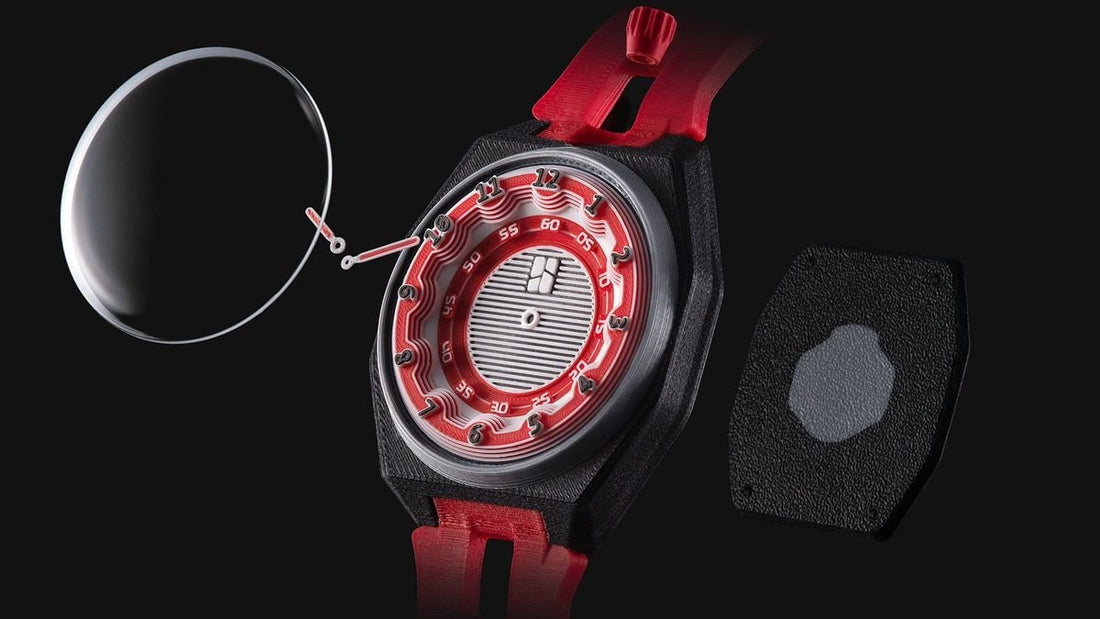
The manufacturer illustrates this with a watch: a 0.2 mm nozzle handles the dial details and a 0.4 mm nozzle handles the case. At the time of the announcement, comparable native support for H2D, H2C and X2D was still in development.
How DRT would evaluate a print
Start with the feature that the customer will actually inspect: lettering, a curved face or a mating surface. Put that region beside the surrounding body in a test coupon. Compare the sliced toolpaths, estimated time, filament use and finished surface against a single-nozzle baseline. Keep the material and orientation consistent so that the comparison answers a useful question. A larger nozzle is worth using when it improves the overall job without compromising the detail that made the part valuable. Save the successful project file as the starting point for the next revision.