
Define the inspection
Identify target surfaces, access, weather and reporting needs. Confirm that aerial thermal imaging suits the inspection.
DJI + ANKER SOLIX
Document roofs, solar assets and equipment with Matrice 4T. Choose a larger charging reserve for the aircraft and on-site review.
Choose your configuration ↓


MATCH THE SETUP TO THE JOB
Solar field kit: equipment, portable power and one PS200 panel.
 1 × DJI Matrice 4T Universal Version$7,849.00 USD
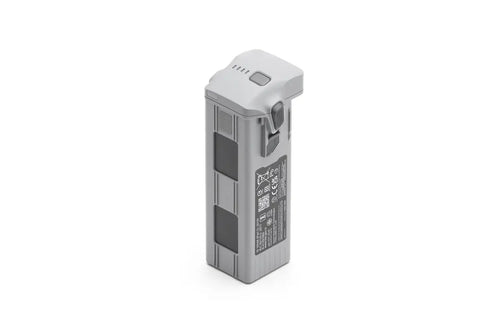
 3 × DJI Matrice 4 Series Intelligent Flight Battery – 99.5Wh$747.00 USD
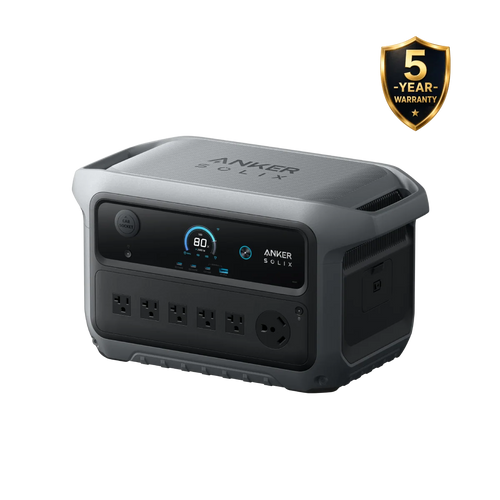
 1 × Anker SOLIX C2000 Gen 2 Portable Power StationAnker SOLIX C2000 Gen 2 Portable Power Station$999.99 USD
 1 × Anker SOLIX PS200 Solar Panel$499.99 USD
Included with the core equipment: Matrice 4T standard package with one flight battery, controller, 100 W adapter, matching hub and case; three additional flight batteries make four total.
Mobile power adds the listed station and its supplied AC charging cable.
Solar field kit adds one PS200 panel and its supplied solar-to-XT60 connection and extension cables. Confirm the cable set against the delivered panel version.
Choose thermal reporting software and a review computer. Add spotlight or speaker only if the assignment calls for them.
Thermal reporting software and a review computer are separate. The 200 W panel is a daytime top-up source, not a promise of unlimited operation.
Solar-kit credit is submitted in cart for the complete solar package.
Review your cart →Core and mobile configurations add individual components. The solar field kit uses the complete bundle and its existing offer. Add-ons are separate; taxes and shipping appear at checkout. Review the final savings before payment.
Already own some equipment? Ask DRT →THE WORKING SCENARIO
Solar rooftops, facilities and field inspections that need RGB and thermal context.
Identify target surfaces, access, weather and reporting needs. Confirm that aerial thermal imaging suits the inspection.
Use M4T thermal images alongside visual detail. Verify temperature parameters and capture conditions with a trained operator.
Flag areas for qualified follow-up and retain the original files. Add C2000 for a longer charging reserve away from mains.
Thermal imagery supports inspection and does not by itself diagnose an electrical fault. Analysis software and specialist reports are quoted separately.
THE LOGIC BEHIND THE KIT

Matrice 4T pairs thermal and visual imagery for inspection work. Capture the context needed for your report.
C2000 Gen 2 has twice the rated energy of C1000 Gen 2, giving a field charging base more headroom for a laptop and controller.
Add the AL1 spotlight or AS1 speaker when the assignment calls for them; neither is required for ordinary thermal capture.
OPTIONAL POWER & SOLAR
For the solar configuration, connect one PS200 to the station’s solar input. The mobile configuration uses the station without a panel. Power the equipment through its original AC cable or matching charger.
PS200 · 200 WIncluded solar-to-XT60 cableC2000 Gen 2AC outlet → original device chargerCharge & workUse the manufacturer’s power cableUse a single panel, not a series string. Confirm the panel label and connector before use. Keep the station and chargers dry, shaded and within their operating temperature limits.
— illustrative daily solar energy
AC estimate = 2,048 Wh × 80% ÷ average watts. Solar estimate = 200 W × sun hours × 75%. These are planning assumptions, not measured kit runtimes; temperature, load, shading and conversion losses change results. Solar output is not added to the AC-runtime estimate.SEE THE CORE EQUIPMENT IN ACTION
Manufacturer demonstrations explain the equipment. Your selected configuration determines which power equipment and accessories are included.
Manufacturer specifications ↗Power station specifications ↗Already own part of this setup? Tell DRT what you have and what you need.
BUILD WITH DRT
Share your equipment and working conditions. DRT can help with the component list, compatible add-ons and configuration quote.
Configuration references reviewed November 9, 2026. Choose the exact model and region when opening a manufacturer document. Kit connections and runtime calculations are DRT planning recommendations, not manufacturer certification of a combined system.