

DJI Modify - Flagship - Permanent
CP.RJ.00000231.01
Free shipping over $599.00
Money Back Guarantee
Pairs well with
DJI Modify - Flagship - Permanent
If you have any questions, you are always welcome to contact us. We'll get back to you as soon as possible, within 24 hours on weekdays.
-
Shipping Information
Use this text to answer questions in as much detail as possible for your customers.
-
Customer Support
Use this text to answer questions in as much detail as possible for your customers.
-
FAQ’s
Use this text to answer questions in as much detail as possible for your customers.
-
Contact Us
Use this text to answer questions in as much detail as possible for your customers.
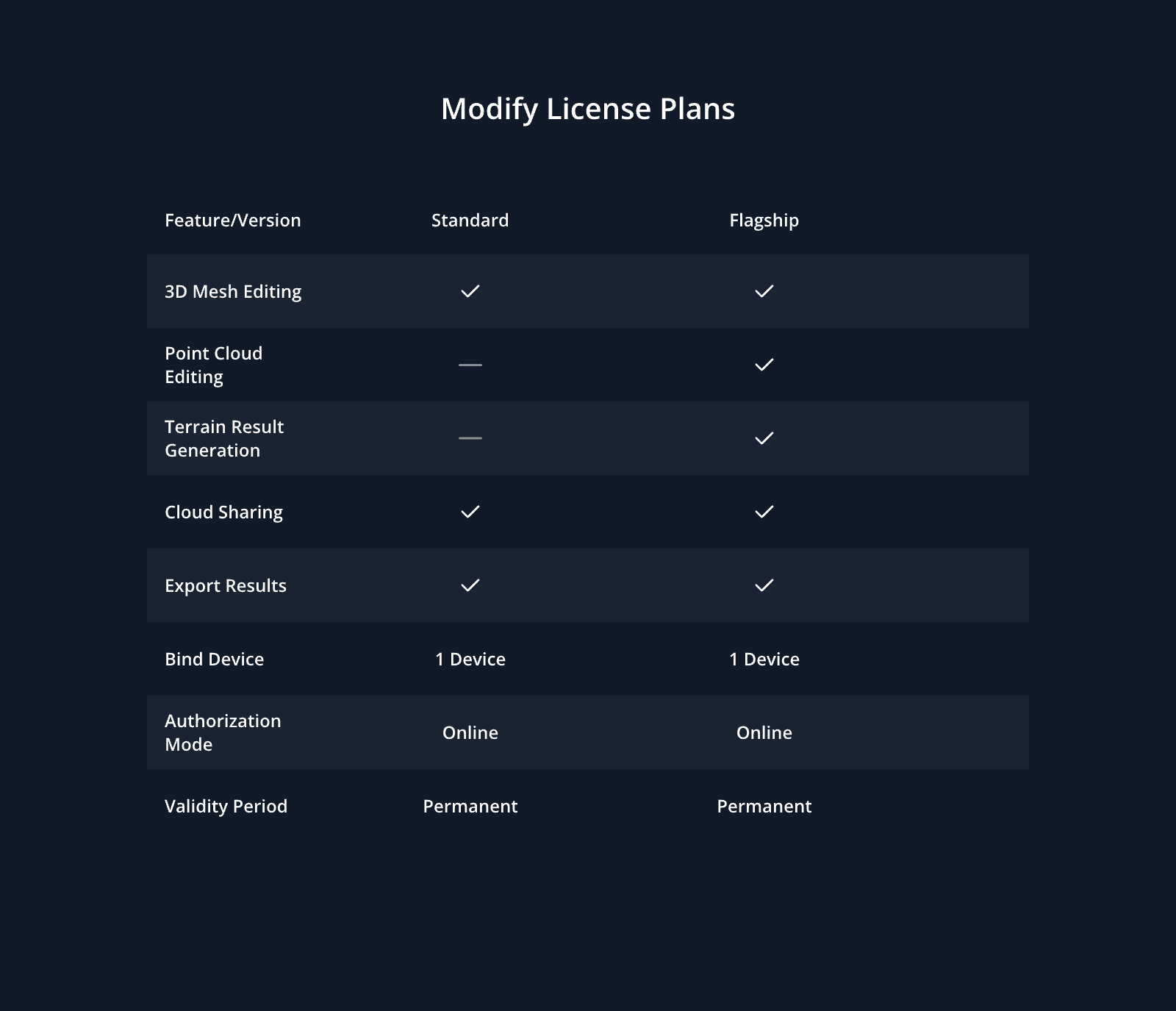
Modify is DJI's first intelligent 3D model editing software, designed for simplicity, intuitiveness, and efficiency.[1] It enables rapid point cloud smoothing, noise reduction, downsampling, and classification, with one-click adjustment of point cloud categories and automatic generation of terrain results. The software accurately identifies and repairs 3D mesh defects—such as floating objects, holes, and vehicles—with a single click, efficiently producing realistic textures.[2]
When integrated with DJI's enterprise drones and DJI Terra, Modify provides a comprehensive, one-stop solution for aerial surveying, modeling, model editing, and sharing. This workflow is tailored for industries such as surveying and mapping, firefighting, emergency response, and transportation.
- Seamless workflow: DJI Modify can work with DJI Terra in a seamless workflow. In a DJI Terra modeling project, you can launch DJI Modify with one click for model editing. This achieves an efficient workflow between DJI Terra and DJI Modify.
- Streamlined interaction: Without the need for complex settings, DJI Modify supports fast import and export of model files and batch editing of multiple models, significantly reducing the model editing workload.
- Efficient 3D Point Cloud Repair: DJI Modify supports point cloud smoothing, noise reduction, downsampling, and classification. Point cloud categories can be adjusted with one click, and terrain results are generated automatically.
- Efficient 3D Model Repair: DJI Modify supports various editing functions such as floating parts removal, surface flattening, texture repair, hole fill, and water surface repair, providing well-edited models at high efficiency.
- Quick Delivery: DJI Modify allows you to export multiple mesh model formats such as PLY, OBJ, and B3DM, as well as various point cloud formats including LAS, PNTS, PLY, PCD, and S3MB in one go. In addition, processed 3D mesh models can be quickly shared to the cloud.
- Authorization Mode[3]: Online authorization is supported.
[1] System requirements: Windows 10 or above (64-bit), 32 GB of RAM, and an NVIDIA graphics card with at least 4 GB of GPU memory and compute capability 6.1 or above.
[2] DJI Modify can edit only 3D visible light mesh models that are reconstructed by using DJI Terra V4.0.0 or later. To learn more about DJI Terra, click Learn about DJI Modify .
[3] Only online licenses are available in DJI Store. Please ensure network connectivity when you use the software. Each license can be bound to only one DJI account and one computer, and the account that is bound to a license cannot be changed.
FAQs
Please read our FAQs page to find out more.
What is DJI Maintenance Program?
DJI Maintenance Program is an aircraft service plan launched by DJI. The service includes basic inspection, update and calibration, deep clean, easily worn parts replacement, core components replacement, and maintenance reports.
If parts that are not covered by DJI Maintenance Program are damaged, then users need to pay to have these parts repaired.
Currently, what areas and product models are supported by DJI Maintenance Program?
Currently supported countries and regions: Currently supported countries and regions: Mainland China, North America (US and Canada), EU, UK, Australia, and Japan.
Currently supported product models: Matrice 200 V2 Serie, Mavic 2 Enterprise Serie, Phantom 4 RTK, P4 Multispectral, Matrice 300 RTK, Matrice 350 RTK, Matrice 30 Serie, Mavic 3 Enterprise Serie, Matrice 3D Serie, DJI Matrice 4 Serie, DJI Matrice 4D Serie, DJI Matrice 400, DJI Mavic 3T Advanced.
* The supported areas for some models are different.
Under which conditions can users use DJI Maintenance Program?
Users can use DJI Maintenance Program as long as:
(1) The products have not been modified or disassembled without previous authorization.
(2) The products are not water damaged.
One maintenance code can be redeemed for the maintenance service how many times?
One maintenance code can be used for the maintenance service one time.
How long is the maintenance code valid for?
The period of validity for the DJI Maintenance Program activation code is 24 months from the date of sale by DJI in North America (the United States and Canada), the European Union, the United Kingdom, Australia, and Japan.
How can I use DJI Maintenance Program?
1) When your DJI aircraft needs maintenance service, you can go to the DJI Online Repair Request page to apply for the maintenance service.
2) After applying for the maintenance service, mail your DJI aircraft to the designated repair center.
3) DJI will provide the corresponding service based on the maintenance plan you chose. If malfunctions not covered by the maintenance service are found during damage assessment, then DJI will send you a quotation for repairing these damaged parts. You can then choose whether to repair these parts or not.
How are the shipping fees and taxes charged for the DJI Maintenance Program?
The two-way shipping fees are covered by DJI if using the DJI Maintenance Program in the corresponding supported region.
If you are in an area which is not supported by the DJI Maintenance Program you purchased, shipping fees and taxes incurred due to cross-region use will be covered by yourself.
If you are in an area which is not supported by the DJI Maintenance Program you purchased but you still want to use the service, you can obtain permission from DJI first, and then shipping fees as well as taxes incurred due to cross-region use will be covered by yourself. If the above conditions are not met, DJI has the right to reject providing the service.
How to check the serial number of my drone or payload?
Please refer to How to find serial number for more information.covered by yourself. If the above conditions are not met, DJI has the right to reject providing the service.